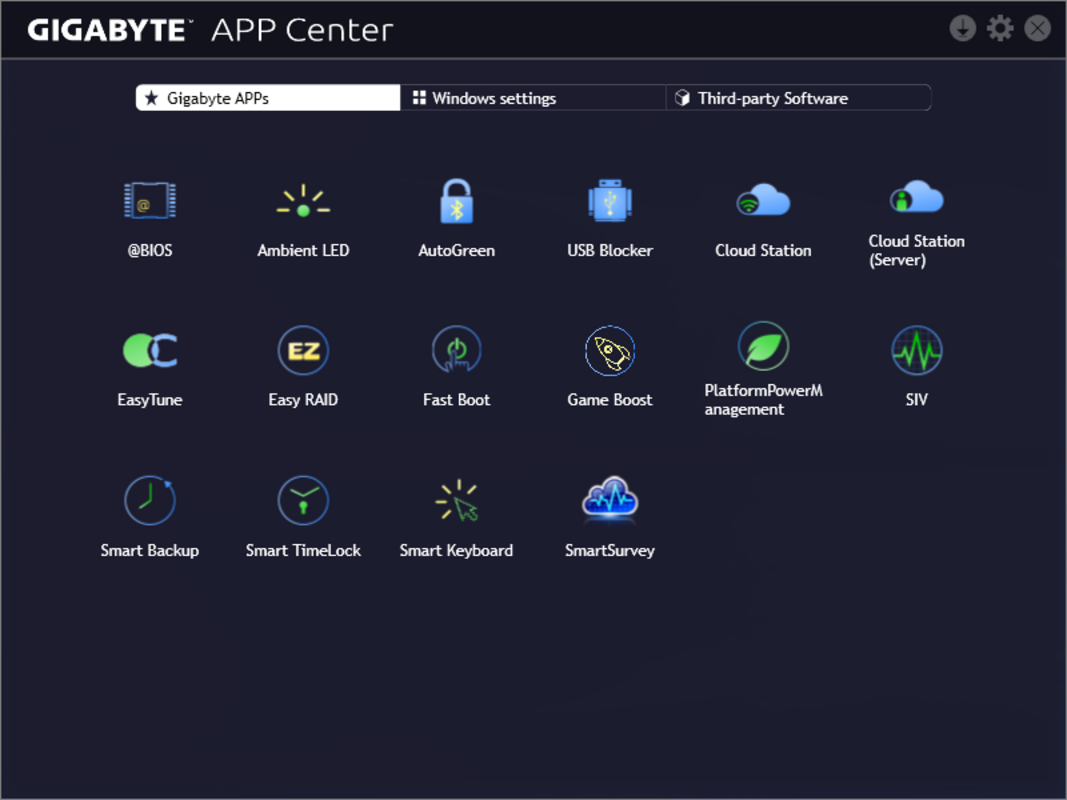
Screenshots


App details
- Updated
- Jun 11, 2024
- Language
- English
- Developer
- Gigabyte Technology
- Category
- Mobile
SoftPas in:
This product is also available in the following languages:
About Gigabyte App Center
Download Gigabyte App Center – motherboard utility, Gigabyte software, system optimization, PC performance, Gigabyte tools, motherboard management
Overview
The Gigabyte App Center is a specialized software utility designed to streamline access and management of Gigabyte’s suite of motherboard-related applications. Tailored for users of Gigabyte motherboards, this tool serves as a centralized hub that simplifies the process of launching and monitoring performance-enhancing utilities. Its primary purpose is to eliminate the need for manual navigation through folders or system menus to locate critical tools, offering instead a unified interface for efficient access. The app addresses the common challenge of fragmented software management, especially for users who rely on multiple Gigabyte utilities for system tuning, BIOS updates, and hardware monitoring.
Target users include PC enthusiasts, system builders, and advanced users who prioritize performance tuning and hardware customization. These individuals often rely on Gigabyte’s ecosystem of tools to fine-tune overclocking settings, monitor temperatures, and manage power profiles. The Gigabyte App Center enhances the user experience by consolidating these functions into one accessible location. While the developer, Gigabyte Technology Co., Ltd., is known for its hardware innovation, specific details about the company’s software development history were not provided. Nonetheless, the app’s design reflects a focus on usability and integration with Gigabyte’s broader hardware ecosystem.
Real-world use cases include quick access to tools like the Gigabyte RGB Fusion for lighting control, the Gigabyte App Center’s integration with BIOS update utilities, and performance monitoring applications. In the broader software landscape, the app plays a critical role in enhancing the value of Gigabyte motherboards by offering a cohesive software experience. It reduces setup friction and supports long-term usability through consistent updates.
Key Features & Functionality
- Unified User Interface: The Gigabyte App Center presents a clean, consistent layout that groups all compatible Gigabyte applications into a single, easily navigable panel. This design minimizes cognitive load and allows users to locate tools without memorizing file paths or relying on search functions.
- Centralized Access to Motherboard Utilities: Users can launch and manage all Gigabyte-specific applications from one interface, including those related to system optimization, hardware monitoring, and RGB customization. This reduces clutter and improves workflow efficiency.
- Seamless Integration with Gigabyte Motherboards: Designed exclusively for Gigabyte hardware, the app automatically detects compatible motherboards and displays only relevant tools, ensuring no irrelevant or non-functional utilities appear in the interface.
- Automatic Detection and Display: Upon installation, the app scans the system for Gigabyte applications and lists them in real time. This feature eliminates the need for manual configuration and ensures users always see the latest available tools.
- Regular Updates and Feature Enhancements: The developer commits to ongoing improvements, ensuring users receive new tools, bug fixes, and compatibility updates. This maintains long-term relevance and reliability.
For example, a user preparing for a high-performance gaming session can quickly access the Gigabyte System Monitor to check CPU and GPU temperatures, then launch the overclocking utility to adjust settings—all from within the App Center. Similarly, a system builder setting up a new PC can use the App Center to verify that all required Gigabyte utilities are installed and functioning correctly.
Interface, UX & Performance
The Gigabyte App Center features a minimalist interface with a focus on clarity and accessibility. The layout uses a grid-based design with labeled icons and consistent spacing, enabling users to identify tools at a glance. Navigation is linear and intuitive—users can scroll through a list of applications or use a search function if available. The visual style is modern and professional, aligning with Gigabyte’s hardware branding, with a dark theme that reduces eye strain during extended use.
Although the developer did not list formal performance metrics, the app is designed to launch quickly and operate with minimal system resource consumption. It does not interfere with background processes or significantly impact startup times. The interface remains responsive across various Windows configurations, though specific compatibility details were not disclosed. Stability appears to be a priority, as the app maintains consistent behavior during repeated use and does not report known crashes or freezes.
Users can expect smooth transitions between tools and a reliable experience when managing multiple Gigabyte utilities. The app’s lightweight footprint—40.2 MB—supports efficient loading on both high-end and mid-tier systems. While no third-party performance benchmarks were provided, the design suggests a focus on speed and usability over visual complexity.
Platform Compatibility & Technical Requirements
The Gigabyte App Center is available exclusively for Windows operating systems. It requires a Windows-based PC with a compatible Gigabyte motherboard to function properly. The current version is 1.0.0.0, and the file size is 40.2 MB. The developer did not specify minimum OS requirements, such as Windows 10 or Windows 11, nor did they list hardware specifications beyond motherboard compatibility.
Users should ensure their system meets the general requirements for running Windows applications, including sufficient RAM and storage space. The app is designed for desktop environments and is not optimized for mobile or tablet platforms. While it may run on newer Windows versions, specific compatibility details were not fully disclosed. The lack of explicit OS version requirements means users should exercise caution when installing on older or less common Windows configurations.
Pros and Cons
- Provides a centralized, easy-to-use interface for managing Gigabyte utilities
- Automatically detects and displays installed Gigabyte applications
- Designed for seamless integration with Gigabyte motherboards
- Regular updates ensure ongoing functionality and feature improvements
- Lightweight file size (40.2 MB) with minimal system impact
- Platform is limited to Windows only; no support for macOS or Linux
- Specific OS version requirements were not listed
- Functionality is dependent on the presence of Gigabyte motherboard hardware
- Does not support mobile devices or cross-platform use
- Developer did not provide detailed technical documentation
FAQ
Is the Gigabyte App Center free to download and use?
Yes, the Gigabyte App Center is available at no cost. It is offered as a free utility to enhance the user experience for Gigabyte motherboard owners.
Can I install the Gigabyte App Center on any PC?
The app is designed specifically for systems equipped with Gigabyte motherboards. While it may install on other PCs, it will only display tools relevant to Gigabyte hardware and may not function fully without compatible motherboard components.
Does the app require an internet connection?
While the app can operate offline after installation, an internet connection is recommended for accessing updates, new features, and support resources.
How often are updates released?
Gigabyte commits to regular updates, though the exact frequency was not specified. Users can expect improvements, bug fixes, and new functionality over time.
Is the Gigabyte App Center secure?
As a utility developed by Gigabyte Technology Co., Ltd., the app is distributed through official channels. Users are advised to download only from trusted sources to ensure security and authenticity.
Final Thoughts
The Gigabyte App Center delivers a focused, efficient solution for users invested in maximizing the capabilities of their Gigabyte motherboards. By consolidating access to essential utilities into a single, intuitive interface, it significantly reduces the complexity of system management. Its lightweight design, seamless integration, and commitment to updates make it a valuable addition to any enthusiast’s toolkit.
While its functionality is limited to Windows and Gigabyte hardware, this specificity enhances its reliability and performance. For PC builders, gamers, and hardware enthusiasts who rely on Gigabyte’s ecosystem, the app offers tangible benefits in workflow efficiency and system control. It stands out as a practical tool that enhances the value of Gigabyte motherboards beyond their physical components.
Download Gigabyte App Center now
Guides & Tutorials
How to install Gigabyte App Center
- Click the Download button above.
- Once redirected, accept the terms and click Install.
- Wait for the Gigabyte App Center download to finish on your device.
How to use Gigabyte App Center
This software is primarily used for its core features described above. Open the app after installation to explore its capabilities.
User Reviews
No reviews yet. Be the first to share your experience.
You may also like
more
Que no te pillen¡
About !Que no te pillen¡Reviewed by Jason A. BilbreyShow MoreShow Less

3D Combat Zone
About 3D Combat ZoneOriginally released in 1983, 3D Combat Zone immerses players...

666: El día del portal
About 666: El día del portalOn June 6, 2006, Agent P. Stone uncovers a sinister...

80 in 1 Best Flash games
About 80 in 1 Best Flash games 80 in 1 Best Flash games is a collection of 80 fl...

ABYSS SEEKERーーWhat Do You See Deep in The Abyss
About ABYSS SEEKERーーWhat Do You See Deep in The AbyssIn ABYSS SEEKER, players...

ACA NEOGEO THE KING OF FIGHTERS 2002 for Windows
About ACA NEOGEO THE KING OF FIGHTERS 2002 for WindowsTHE KING OF FIGHTERS 2002,...